

For years, smartphone users in the Philippines have navigated a digital divide. If you owned an iPhone and your friend had an Android, sharing high-quality photos and videos was a chore. You’d resort to compressing files on messaging apps, tedious Bluetooth pairing, or relying on third-party applications. That era of inconvenience is officially over. In a groundbreaking move, Google has announced that Apple’s AirDrop and Android’s Quick Share now work together, creating a seamless bridge between the two dominant mobile ecosystems.
This is a game-changer for everyone, from students sharing project files to families sharing precious moments captured on their devices. The invisible wall has finally come down, ushering in a new age of interoperability that promises to make our digital lives significantly easier.
Understanding the Magic: What is AirDrop and Quick Share Interoperability?
Before diving into the “how-to,” let’s break down what these technologies are. For the uninitiated, AirDrop is Apple’s proprietary feature that allows users to wirelessly send photos, videos, documents, and more to other nearby Apple devices. It’s known for its incredible speed and simplicity.
On the other side, Quick Share is the Android equivalent, developed by Google and Samsung. It functions similarly, using a combination of Bluetooth and Wi-Fi to transfer large files quickly between Android phones, tablets, and Chromebooks. The recent announcement means these two separate technologies can now communicate directly, allowing for cross-platform transfers without a hitch.
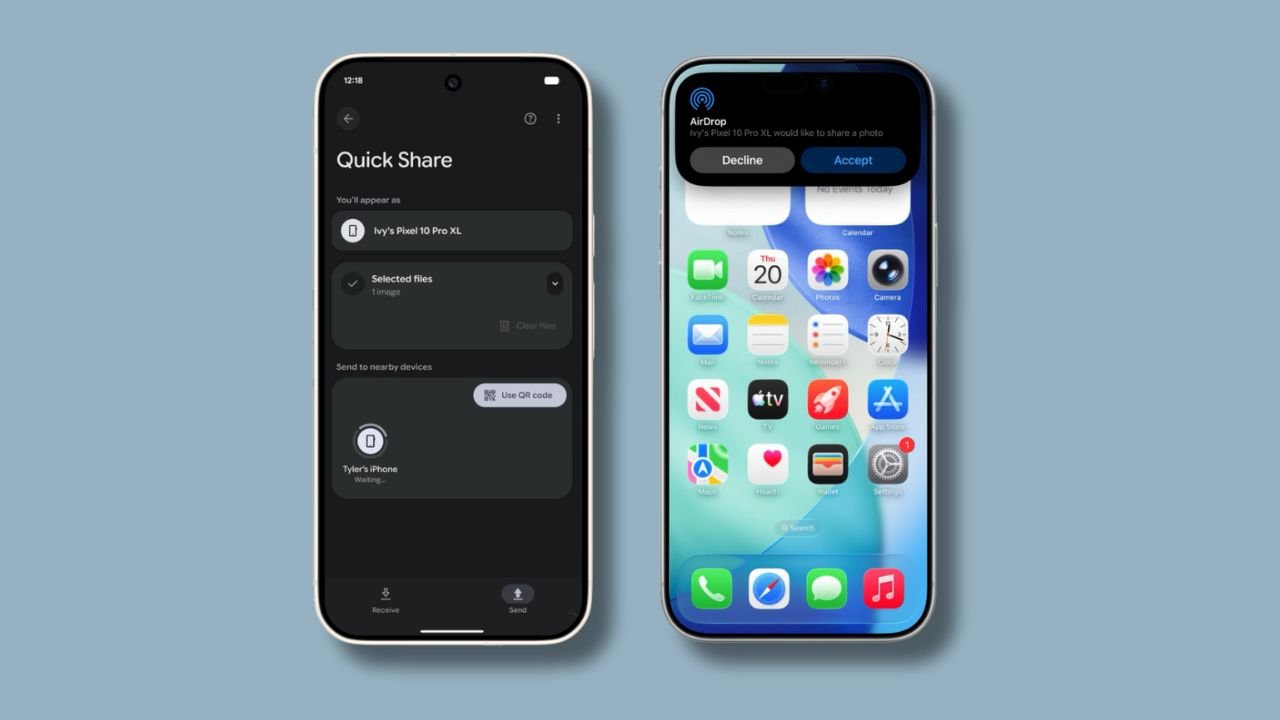
A Step-by-Step Guide: Sharing Files Between Your Devices
Getting this new feature to work is straightforward, but it requires specific settings to be enabled on both devices. Here’s a detailed guide to ensure your first cross-platform sharing experience is a success.
Sharing from an Android Device to an iPhone
Imagine you’ve just taken a stunning group photo on your new Android phone and want to send the high-resolution original to your iPhone-using friends. Here’s how:
- Select Your File: Open your gallery or file manager, select the photo, video, or document you wish to send, and tap the ‘Share’ icon.
- Choose Quick Share: From the share sheet, select ‘Quick Share’.
- Find the iPhone: Your Android phone will begin searching for nearby devices. The recipient’s iPhone should appear in the list.
- Prepare the iPhone: On the receiving iPhone, the owner must navigate to Settings > General > AirDrop and select ‘Everyone for 10 Minutes’. This makes the device temporarily discoverable to non-Apple devices.
- Accept the Transfer: Once you send the file from your Android, a standard AirDrop notification will pop up on the iPhone. The user simply needs to tap ‘Accept’, and the file will be saved to their device.
Sharing from an iPhone to an Android Device
Now, let’s reverse the roles. You have a video on your iPhone that you need to send to a colleague’s Android phone.
- Initiate the Share on iPhone: Select the file you want to share, tap the ‘Share’ icon, and then choose ‘AirDrop’.
- Prepare the Android Device: On the receiving Android phone (initially, the Pixel 10 series), open the Quick Share settings from the quick settings panel. Set your device’s visibility to ‘Everyone’. This mode typically lasts for 10 minutes for security purposes.
- Select the Android Phone: Your iPhone will now see the nearby Android device in the AirDrop menu. Tap on its name to begin the transfer.
- Accept on Android: A notification will appear on the Android device, asking to accept the incoming file. Tap ‘Accept’, and the file transfer will complete in seconds.
Device Compatibility: Who Gets This Feature First?
Initially, this groundbreaking interoperability is launching exclusively on Google’s latest flagship devices: the Pixel 10, Pixel 10 Pro, 10 Pro XL, and the 10 Fold. However, Google has confirmed that this is just the beginning. The feature is slated to roll out to a wider range of Android smartphones from various manufacturers in the coming months.
This means owners of powerful new devices like the recently launched OPPO Find X9 and other flagship models will be eagerly awaiting the software update that enables this functionality. It’s a significant step towards unifying the user experience across all modern smartphones.
Security First: Is Cross-Platform Sharing Safe?
In a world of increasing digital threats, security is a primary concern. Google has emphasized that this feature was built with a multi-layered security approach to ensure your data remains protected during transfers.
- Secure Channel: The connection utilizes a secure, direct, peer-to-peer channel, meaning your files are not uploaded to a cloud server during the transfer.
- Platform Protections: It leverages the built-in security features of both Android and iOS to safeguard against potential vulnerabilities.
- User Control: The requirement to set visibility to ‘Everyone for 10 Minutes’ ensures that your device is not constantly open to receiving files from strangers. You are always in control of when your device is discoverable.
Furthermore, Google announced that a ‘Contacts Only’ mode is in development for a future update, which will add another layer of privacy and convenience.
Conclusion: A Major Win for Filipino Tech Users
The integration of AirDrop and Quick Share is more than just a technical update; it’s a quality-of-life improvement. For Filipinos who frequently mix and match devices within their families and social circles (barkadas), this eliminates a long-standing point of friction. No more debates over which phone takes the picture, no more blurry photos sent over chat apps, and no more complicated workarounds. This is a practical, powerful solution that finally puts the user experience first, regardless of the brand of smartphone in your pocket.
